Few Simple Tips to Protect Passwords of Your Social Networking Accounts

Few Simple Tips to Protect Passwords of Your Social Networking Accounts

Few Simple Tips to Protect Passwords of Your Social Networking Accounts

password leak
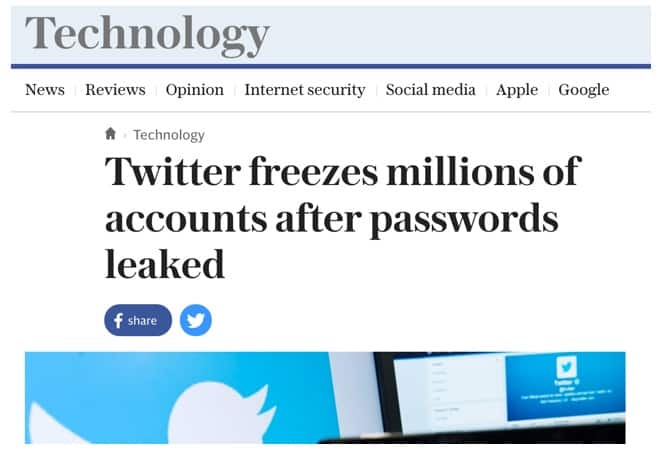
These password leaks happen all the time. One of your accounts may also get hacked one or the other day. Here are some useful tips that are to be followed by every user to ensure their safety. Initially, you need to know, how your password gets leaked?

How Do Password Leaks Happen?

Hackers find a way in, grab the database that contains hashed passwords, and then sell them off.
Information may also be leaked from an inside source i.e in the case of the Ashley Madison data leak. Disgruntled employees have a reputation for causing various types of havoc, and data leaks are among their tactics.
Irrespective of the source through which data obtained, it’s then either sold on the dark web or posted publicly on a site like Pastebin.
HOW TO BACKUP WHATSAPP CHAT HISTORY, CONTACTS & PHOTOS TO GOOGLE DRIVE

HOW TO BACKUP WHATSAPP CHAT HISTORY, CONTACTS & PHOTOS TO GOOGLE DRIVE

HOW TO BACKUP WHATSAPP CHAT HISTORY, CONTACTS & PHOTOS TO GOOGLE DRIVE

New Backup Feature on WhatsApp

WhatsApp has rolled out a new feature that allow users to backup
conversations, images and other information on WhatsApp to Google Drive. This new feature is available in the new 2.12.45 version of WhatsApp for its Android users. Already there is an  offline conversation backup feature in WhatsApp. But, with this new  online conversation backup, all your WhatsApp conversations, and other chat histories can be viewed in Google Drive. The backup process becomes faster if you backup chat info when you’re online.
WhatsApp
The official update of this version has not published, but still you can download and install the latest version of WhatsApp from the ApkMirror site. It is completely safe and secure to use this version on your smartphone. Here is a step-by-step process to backup WhatsApp chat history like conversations, contacts and photos to Google Drive.

How to backup WhatsApp Conversations, Contacts & Images to Google Drive

  • Initially, you need to download and install WhatsApp V2.12.45 on your device.
  • Once the installation is completed, go to the App Settings >> Chat Settings >> Chat Backup.
  • Now, a new screen pop-ups that show your last backup time along with Google Drive settings with three options such as Backup frequency, Account, and Backup chats.
  • WhatsApp - How to Backup chat history
    • Backup Frequency: You can change the frequency from off to daily (or weekly or monthly) based on your c
    • Backup Chats: This option lets you choose Only over Wi-Fi or Wi-Fi and other cellular networks.
    WhatsApp - Backup Now
    • Usually, WhatsApp performs a backup at 4 a.m. if you choose a daily backup. If you want to backup right now, then you can choose “backup now” option from the app’s settings.
     Note: Make sure that once you commence the initial backup, you shouldn’t (cannot) stop it. Because it takes pretty long time as the size of all WhatsApp files are  quite large.
    • Once you’ve completed to backup WhatsApp information to Google Drive, all your data will be saved in your account’s Google Drive.
    • You can access saved files by heading to Settings >> Manage Apps in Google Drive on the Web. Sometimes, all your WhatsApp’s backed-up files will be listed as hidden data.
Brighten Up Your Selfie As OPPO Launches Entry-level A37 in India Priced At Rs.11990

Brighten Up Your Selfie As OPPO Launches Entry-level A37 in India Priced At Rs.11990

Brighten Up Your Selfie As OPPO Launches Entry-level A37 in India Priced At Rs.11990

OPPO, the leading global technology brand, is all set to launch its latest selfie technology with a spectacular design. OPPO brings for its consumers the new entry-level A37 which is equipped with two-high performance cameras, power-packed with an upgraded ColorOS 3.0, making it a superb all-around experience for users. The A37 will be launched in India on the 1st of July, priced at INR 11990. The OPPO A37 will be available in two Colors: Gold and Grey.

Brilliant photography, front and back

The A37 brings users an outstanding selfie experience, even in low-light conditions. It uses a 5 MP front camera with a 1/4-inch sensor and OmniBSI+ (backside illumination), while its extremely large 1.4μm pixels, the biggest available in this price segment, increase light sensitivity and reduce noise. Coupled with the Screen Flash feature, which emits a flash from the display, these features ensure that the A37 takes bright and natural-looking selfies in any condition. The Beautify 4.0 technology has been optimized using data from millions of users, and now supports 7 different levels of intelligent beautification, with two modes for different skin tones. This allows the A37 to capture your best look at any moment.

Beautify 4.0 makes for perfect selfies

The A37 sports an 8 MP rear camera with a 1/3.2-inch back-illuminated sensor and the same large 1.4μm pixels as the front camera, for maximum light sensitivity and minimum noise. The large pixels also work to bump up the dynamic range and give pictures a vivid depth. Meanwhile, with Ultra-HD mode, the A37 shoots five photos consecutively and combines the best parts of each, creating 24 MP photos with breathtaking color and detail.
The A37 sports a high-performance camera to capture wonderful moments in your life.
To avoid accidental shakes when a user’s arm is outstretched to take a selfie, the A37 features Palm Shutter. By simply waving a hand in front of the camera, users can activate an automatic photo countdown, with a customizable duration. The A37 also comes packed with 9 awesome filters and a host of shooting modes, including Double Exposure and Slow Shutter, opening up endless possibilities for creativity and style.
The A37 features a sleek and stylish design.
The A37 evokes a sleek, understated elegance. Its 5-inch display is covered in 2.5D Corning Gorilla Glass 4, giving a premium look without sacrificing premium durability, while the flawlessly smooth rear surface is expertly calibrated for a comfortable, stable grip.
Fitted with an internal high-strength magnesium aluminum alloy framework, the A37 weighs in at only 136 grams. It’s an impressively balanced weight, giving the phone a beautifully light, but never insubstantial, feel.
The eye-catching device comes in three lustrous metallic colors: Gold and Grey.

Snappy performance, new triple-slot card tray

Triple-slot card tray
The A37 cruises on 2GB RAM and a quad-core 64-bit Snapdragon processor, for a seamless multitasking experience. It supports 16GB ROM, expandable by another 128 GB, giving you plenty of room for all of your favorite media and memories.
An expandable memory slot sits alongside two additional 4G SIM slots supporting speeds of up to 150 Mbps. Keeping life balanced is a breeze with the new triple-slot tray.
The A37 uses OPPO’s all-new ColorOS 3.0, fully upgraded for faster, smoother and more efficient performance. Combining a leaner design and purpose-built optimizations for a range of common use scenarios, ColorOS 3.0 has a running speed that’s more than 20% faster than the previous ColorOS 2.1. ColorOS 3.0 is also customized for power-saving, with an automatic cleanup feature that adapts to user habits to keep their battery going strong throughout the day.
ColorOS3.0 supports a special Privacy Protection feature, allowing users to easily designate any contacts, apps, files, or other content as private. Then, when users activate the feature (for example, when lending the phone to a friend or colleague), all private info will be hidden automatically so the user can share the device without any worry.
The A37 also inherits OPPO’s legacy of premium audio experiences. With Dirac HD Sound, users will enjoy audio that’s as close to the original performance as possible.
6 Things you must know before downloading WhatsApp Gold

6 Things you must know before downloading WhatsApp Gold

                      6 Things you must know before downloading WhatsApp Gold


well, if you have got an invite to upgrade your green and boring WhatsApp to a Gold and sophisticated one, sadly you have been tricked. And, if you haven’t, beware, you might be next in line. For people wondering what WhatsApp Gold exactly is, here’s a detailed breakdown about the same.
1) Branded as an ‘exclusive version’
Since exclusivity always sells more, the app has been branded as an ‘exclusive version’ of the original app. According to the messages received by various current WhatsApp users, ‘WhatsApp Gold’ will not be available to all WhatsApp users and can only be installed via an invitation.
2) Users have to click on a website to get the Gold version
Once a user receives an invitation for the Gold version upgrade, they’re asked to visit the website, www.goldenversion.com, and click on the link given for the Gold version to download their App.
3) Celebrity App for celebrity users
The invite for the app claims that ‘WhatsApp Gold’ is to be used by only ‘big celebrities’. Further, it also boosts about the extra features that the Gold version comes with. The extra themes apparently include ability to change and choose WhatsApp themes, send 100 images all at once as compared to the current 10 images limit, free calling, video calling ang much more.
4) Hacker’s Day Out
According to tech experts, the invite is a way by which hackers are stealing your phone data and keeping a close track of all your movements. Once you click on the website given and start downloading the program, the website will end up infecting your precious phone with malware, which will possibly lead to hackers stealing your important data and tracking all your activity and movements.
5) Previous Scams Involving WhatsApp
Does the name, WhatsApp Plus, ring a bell? Yes, it is the same royal blue colour version that was doing rounds of the social media a few years ago. This was another WhatsApp related scam that garnered major eyeballs prior to WhatsApp Gold. Such has been the frequency and the level of these scams that WhatsApp has even included a special disclaimer about these in its FAQ section.
Warning about the WhatsApp Plus App, the company came forward with the following warning for its loyal users.
“WhatsApp Plus is an application that was not developed by WhatsApp, nor is it authorized by WhatsApp.”
“The developers of WhatsApp Plus have no relationship to WhatsApp, and we do not support WhatsApp Plus. Please be aware that WhatsApp Plus contains source code which WhatsApp cannot guarantee as safe and that your private information is potentially being passed to 3rd parties without your knowledge or authorisation.”
6) WhatsApp policy on upgrades
In order to make the users aware about such scams, WhatsApp has even made an effort to let WhatsApp users know about its Upgradation policy notifications in detail. According to it, the app will never send its users a text message to upgrade or download another app, in fact, it will only communicate them any Upgradation notification over official points of contact like sending an email on their registered email ids etc.
Google To Launch its Own Smartphone by Year End; Following Apple’s philosophy?

Google To Launch its Own Smartphone by Year End; Following Apple’s philosophy?

Google To Launch its Own Smartphone by Year End; Following Apple’s philosophy?

ilicon Valley-based tech giant, Google has squarely dominated the smartphone market with its Android OS, used in over 80% of the smartphones used today. Even though it does not develop the hardware for these smartphones, the ‘open source’ software OS provided by Google is the major reason why these handsets sell.
After almost 9 years of being in the industry, the company is now planning to launch its own smartphone by the end of this year. By own smartphone we do not mean the existing Nexus devices, but completely its own, including manufacturing, from the hardware to the software. While Google has been releasing Nexus Devices, they are all launched in partnership with a Smartphone vendor, who manufactures it for them!
Google-SmartPhones
This device, or set of devices, will be the first Google-owned Non-Nexus devices. It is already in talks with mobile operators to launch its own smartphone, according to a report by the Telegraph.

Reasons for launching its own smartphone

Most of us would have experienced Google’s constant nagging about providing regular updates to users and pushing handset makers to upgrade their smartphones as soon as possible. Marshmallow, Google’s latest version of Android, is present on only 7.5% of the Android devices globally.
Google also reprimanded some handset makers for not upgrading their smartphones to latest versions of Android, thereby shooing people away from the innovative OS and negatively affecting the sales of the Android-based smartphones. There are pros and cons to an open-source OS and fragmentation is one huge problem for the tech titan.
Apart from Google’s Nexus devices, only a few flagships are able to receive regular software upgrades. It is possible that Google wants to finally follow Apple’s strategy and launch its own smartphone to pursue defragmentation.
Time and again, Google has struggled to increase the market share of its latest Android version, and with its own smartphone, it can hope for things to improve. The company is also contemplating punishing handset makers that do not adhere to Google’s directives. Indirectly, these handset makers are cannibalizing Android’s sale across the world.

What does this mean for Nexus devices?

Although Google has not yet shared any information about the fate of the Nexus devices, we’re quite sure the flagship series will not be wiped off completely. We should continue to see Nexus devices every year, considering Google has the power to direct companies to employ hardware of its choice.
his year’s Nexus devices have been rumoured to be developed by HTC and should be launched in September/October 2016. Alongside these smartphones, Google wants to pitch-in a product it feels will allow it to have more control over the operating system.
We feel Google’s hardware will be top-notch like its software, and the smartphone would be power-packed at a reasonable price. It will give Google some control over the Android OS industry and propel it to take on Apple’s iPhones.
How to Remove Cerber Virus and Decrypt the Infected files?

How to Remove Cerber Virus and Decrypt the Infected files?

How to Remove Cerber Virus and Decrypt the Infected files?

The last 2-years haven’t been easy for the cyber security agencies. The rise of different types of Ransomware with all of them performing the same type of dirty work has made life difficult for the Cyber Security Professionals. Millions of dollars have been lost in the last few years at the hands of Ransomware yet we haven’t devised a plan to deal with the upcoming threats. However, while there is nobody denying that there is no consensus on how to deal with all kinds of Ransomware in a similar way, we will present to you a method of dealing with Cerber.
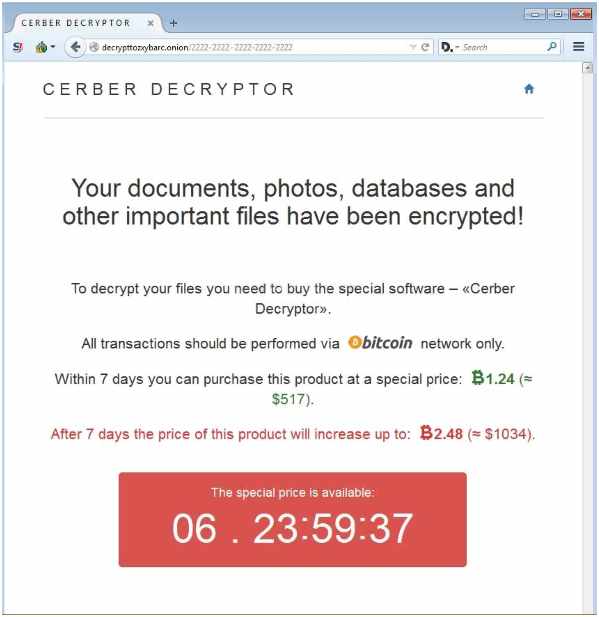
Cerber is no different from its predecessors as it creates 3 files in the computer after encrypting the data. Afterwards, it asks the victim to pay the ransom – which varies in different cases, with a threat of destroying the data if the victim decides to do otherwise.
Thus, if you are the one or know someone who has been disturbed with the shenanigans of Cerber, below mentioned are some of the methods to decrypt your useful data …

How Cerber Penetrated through and Infected Your Computer


milar to a technique that has been epitomized by the authors of Malware in the past few years, Cerber uses a spam email which contains an attachment, to penetrate into your computer. If the user wants to turn him/her into a victim, they would open the file and that will be equivalent to handing over the keys of your home to a robber.
As you might guess, once a user does it, there is simply no way back because of the execution and running speed of Cerber. The Antivirus that are installed on your computer has a very remote chance to catch Cerber because it constantly modifies its appearances.

What to do if your system has been infected with Cerber?

First of all, you don’t need to panic as it would only aggravate the matters. Secondly, you are ought to start your computer in a safe mode. In order to start your computer in safe mode, the following are the few steps that you need to follow.
  • Restart the computer using normal way
  • Before the system starts again, hit f8
  • This F8 will lead you towards a screen with the title of “Advanced Boot Options”. Here, there will be a myriad of menu bars. Click on the one which is titled as “Safe Mode with Networking”
Now that you have entered into your computer in a safe mode, open the internet browser and download an antivirus with which you have worked before and is reliable. Scan the entire computer, no matter how much time it takes. At the end of the scan, you will see that the antivirus would have listed some threats. Delete ALL of them.
If you are unsure about the antivirus which would detect the entries of Cerber, download the below mentioned removal tool

How to remove files and folders of Cerber

After Cerber had infected your computer, it is likely that it would have created entries and files. Therefore, it is necessary for you to MANUALLY remove them all.
Following are the entries that you need to remove from Registry.
HKCU\Control Panel\Desktop\SCRNSAVE.EXE "%AppData%\{2ED2A2FE-872C-D4A0-17AC-E301404F1CBA}\{randomname}.exe"
HKCU\Software\Microsoft\Command Processor\AutoRun "%AppData%\{2ED2A2FE-872C-D4A0-17AC-E301404F1CBA}\{randomname}.exe"
HKCU\Software\Microsoft\Windows\CurrentVersion\Policies\Explorer\Run "%AppData%\{2ED2A2FE-872C-D4A0-17AC-E301404F1CBA}\{randomname}.exe"
HKCU\Software\Microsoft\Windows\CurrentVersion\Run\{randomname} "%AppData%\{2ED2A2FE-872C-D4A0-17AC-E301404F1CBA}\{randomname}.exe"
HKCU\Software\Microsoft\Windows\CurrentVersion\RunOnce\{randomname} "%AppData%\{2ED2A2FE-872C-D4A0-17AC-E301404F1CBA}\{randomname}.exe"

After removing the aforementioned entries, also remove the files with the following names/extensions …
%AppData%\{2ED2A2FE-872C-D4A0-17AC-E301404F1CBA}\{randomname}.exe

How to decrypt the files that have been encrypted by Ransomware?

There are four ways you could decrypt the files. All of them have been mentioned below …

Use an automated Encryption tool

Luckily for us Computer users, reliable Cyber Security Giants like Kaspersky has developed Ransomware decryptor over the years. As suggested by its name, the Kaspersky Ransomware detector would decrypt all the files that have been encrypted by Cerber.
Download from Here

How to manually delete .cerber files

Decrypt .cerber files manually
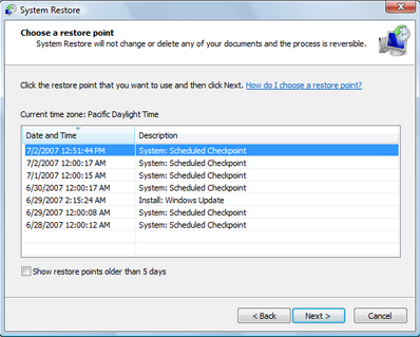
If you use Windows 8 or higher operating system, slide your cursor to the top left side and a black box will appear. Thereon, search for “System Restore”. For all the previous versions of the windows, go to the start menu and search for the same.
After you have found the whereabouts of system restore, start the search. Click on the result and follow the instructions that appear on your screen to proceed.

Activate the previous version of the files

Files Modified by Cerber
In case the Windows Backup is active on your computer, it would have made copies of all the files and folders that are present in your device. Thus, as you might guess, you could utilize this option to get back the files and folders that have been modified or destroyed by Cerber.
For any file that you choose to restore, right click on it and then click on the “Properties”. There you will find a tab with the name of “Previous Version”. Here, select the latest version and then select “Copy”. Finally, Click “Restore”.

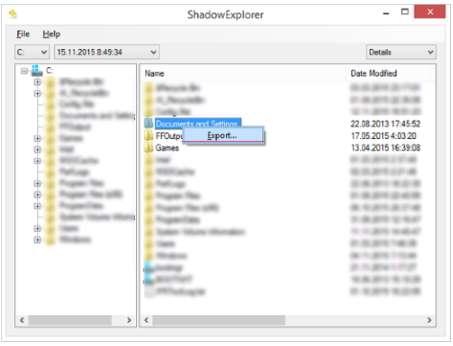
Restore using shadow copies

Restore .Cerber Virus
As evident from the aforementioned screenshot, you need to download and run Shadow Explorer. Afterwards, click on the folders where Cerber has attacked and then select export to restore the files.

How to Protect your Computer with HitmanPro

hitman pro ransomware romoval
Even though you could be of the view that your antivirus is the best in the world, I would suggest you go for HitmanPro.Alert. This is a very famous malware scanner and would shield your system from Ransomware attacks.
Hope these tips will help you to remove .cerber ransomware from your computerCerber Virus Infected PC
Top 5 Best Psychic Apps for Android and iPhone

Top 5 Best Psychic Apps for Android and iPhone

Top 5 Best Psychic Apps for Android and iPhone

Ever wondered what the tarot card readers whom you encounter in daily life think? Clairvoyance is another psychic field which seems at a long distance from the comprehension of ordinary mind. In addition, you might have noticed that some people have a better 6th sense than the others which increases their extrasensory perception.
Thus, if you have ever wondered about any of the aforementioned issues, allow me to tell you that you have come to the right place. While we won’t be divulging into the basics of this mystical psychic world, we are going to provide you with enough stuff to make you that person which you have always adored.

As the human beings of the 21st century, a large portion of our day is spent in front of our mobile screens. Thus, if you want to learn something nowadays, it would be much easier for you to do that if that thing remains in your mobile. Thankfully, there are some best phychic apps that are available out there in the market that will increase your perception.  I would also recommend these spiritual apps for a regular meditation practice.


Here are top 5 Psychic Applications for Android.

1:- Oranum Android App

They say that if you want to test the effectiveness of any App, the best way to do it is to look at its reviews. While this app has been downloaded a mere 10,000 times – a humbling number when you compare it with gaming apps, the rating that this app has received from its user-base is commendable. For an app that allows you to reach more than 200 experienced psychics – in addition to 20 different services like tarot reading and gipsy card reading, a 4.6Star Rating indicates the veracity of this application.
[Download Here]

2:- Psychic Pyramid

Still at its initial stage, Psychic Pyramid has been developed by Cliff Koperski. In addition, it has been optimized for all modern tablets and phones which means that it fits all sizes without any resolution issues.
[Download Here]

3:- Live Psychic Reading

As suggested by its name, this app is live at the time which allows you to interact with best astrologers, tarot masters, healers, clairvoyants, and psychics. As a result, no matter what your issue is, Live Psychic Reading has a tailor-made solution reading for it. Thus, whether you want your marriage life to get back on track, want to be told about the revenue you could generate in the upcoming year or looking for a shortcut to get out of the crisis, Live Psychic Reading is only a call away.

4:- Psychic Test

Ever thought that you’re psychic, or being told by someone? Don’t worry as you’re just one test away to find out. In this interactive and user-friendly app, all you got to do is to answer some questions that will gauge the innate psychic abilities in you. Afterwards, the app is automatically programmed to reveal the truth.
[Download Here]

5:- Psychic IQ

Have you ever come across a situation which you think that you have seen before? Well, if you have come across any such type of event, Psychic IQ App will tell you whether you have the divine powers that will make you a hot cake among your colleagues.
[Download Here]

6:- Bonus Ball – Psychic Self Defense

As we all are aware of the saying that a sound mind is in a sound body, what if the mind is attacked with a force about which you know nothing? The consequences could be brutal as your decision-making ability might be taken away from you. In fact, this isn’t a theory as the concept of psychic attacks was very common in ancient societies. Thus, if you want to learn the methods with whom you could defeat those attacks, Psychic Self-defense will unveil some secret techniques that would fortify your brain.
[Downlaod Here]

Here are the top 5 Psychic Applications for IOS.

1:- Oranum IOS App

Similar to its counterpart for Android that leads our list, the Oranum IOS App has also left other Psychic apps behind. This app shares the accolade of organizing the conferences of Esoteric Communities. In addition – similar to its Android counterpart, Oranum IOS App provides its users a wide list of world-renowned Clairvoyants, Tarot Masters, Psychics and Healers. Thus, if you’re having a problem yourself or know someone who is going through misery, Oranum IOS is a MUST download.
[Download Here]

2:- Tarot & Numerology (Free) by Phuture Me Ltd

As suggested by its name, this app takes use of the ancient technology of Numerology to solve your problems. With a standard 78 tarot card deck and Pythagorean Numerology Calculators, another incentive that this app offers to its users is that it is totally free of cost.
Thus, if you want to know which day of the upcoming week/month/year would be lucky for you, all you got to do is to download this free app.
[Download Here]

3:- Awakening Queen Maebh

If you want to listen to music or share an affinity towards the Oracle – or looking for a book club that features Hay House, Awakening Queen Maebh is just a few taps away from you. Also, this app has quite a lot of surprise built into it which would only be unveiled when you download it on your iPhone.
[Download Here]

4:- Psychic Readings, Astrology, and Love Books

For persons like us who want to read psychic books, the biggest problem we encounter is that there isn’t a database that houses most of them. However, thanks to this app as it provides a whole library of Psychic books, you don’t have to search multiple pages of Google to get your hands on your desired book.
Another area where this app gets the lead over its competitors is its replying technique. It won’t indulge in your private matters – until you ask it to, and will give to-the-point replies within seconds. Thus, if you feel like running out of time and want to have a quick chat, Psychic Readings, Astrology and Love Books is the best application for you.
[Download Here]

5:- Psychic Readings by Nadia

While the majority of us aren’t psychic, still we are curious enough to have a quick glance over daily horoscope on some meaningless website. However, thanks to the Psychic Readings app, we have a free daily horoscope app on our fingertips.

Psychic Apps for Android and iPhone